Pink browser window

telackey

New member
Mar 5, 2024
11
11
3
Tulsa, OK
I will grab a screenshot later, but to enable some sort of reasonable browsing on my O2 R5K, I launch the browser over ssh on a RaspberryPi (pi4 in my case) with my O2 as the remote X display target. It works pretty well all things considered.

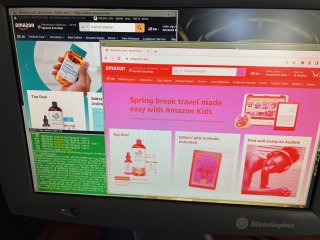
However, chromium and Vivaldi browsers display with a red/pinkish hue cast over the entire window. As I result, I've been using luakit, which displays perfectly. I haven't even attempted to debug this, but I wondered if anyone had encountered something similar using remote X.
 
Same here, some apps display in red. I have not tried luakit yet, I use Midori as x-forwarded browser and colors are OK.
 
Here is an example. Luakit on the left, Chromium on the right. I tried various --disable-gpu and related options but no change.

Firefox works OK, but is very sluggish.
 

Attachments

  • pink.jpg
    pink.jpg
    882.7 KB · Views: 259
Last edited:
Have you solved the pink color issue? If I recall correctly, this is due to color depth or number of colors on the SGI machine. If you change it in X config and restart with a higher setting, it will be good. I don't recall whether the solution was to modify the Xsgi startup line or this was choosable from the GUI-based resolution chooser.
 
Here is a good guide on that https://software.majix.org/irix/desktop-depth.shtml . SGI always defaults to 8 bit depth on the desktop. This is because older programs individually request 24 bit depth. Since newer programs assume 24 bit depth, they never ask for a 24 bit window on start. It's good to update that setting in general, and hopefully it helps with your issue.
 

About us

  • Silicon Graphics User Group (SGUG) is a community for users, developers, and admirers of Silicon Graphics (SGI) products. We aim to be a friendly hobbyist community for discussing all aspects of SGIs, including use, software development, the IRIX Operating System, and troubleshooting, as well as facilitating hardware exchange.

User Menu